URLs, IPs & Ports
This topic provides an overview of URLs, IP addresses and ports that must be added to the allow list (also known as whitelist) in your firewall to ensure that the Ivanti Neurons Platform and its agents can communicate.
The overview starts with information that applies to all environments (Common URLs for all environments, directly below), followed by information that differs based on where your environment is hosted:.
All outbound network traffic is typically via port 443 and 8883. Network communication from Ivanti Neurons to agents is done through MQTT technology. Individual services on the Ivanti Neurons agent can communicate to Ivanti Neurons on secure port 443.
In some locked down environments, you will also need to specifically allow traffic over the default dynamic port range which is: 49152 - 65535.
TCP ports 1024-1034: WMI - These are the so-called "ephemeral" or "dynamic" ports. After the initial connection on port 135.
Revision history
This topic was last updated on September 09, 2026.
Accessing and interacting with the Neurons Platform portal
The table below outlines the URLs needed to interact with the Neurons Platform portal.
This includes using consoles from other Ivanti solutions to prepare data for use in the Neurons Platform, such as UWM Hybrid Deployment. For more information, see the Application Control (Hybrid), Environment Manager (Hybrid), and Performance Manager (Hybrid) capabilities in Agent Policy Capabilities.
| URL | Remark |
|---|---|
| https://app.launchdarkly.com https://events.launchdarkly.com | Feature availability |
| https://dc.services.visualstudio.com/ https://westeurope-2.in.applicationinsights.azure.com/v2/track | Microsoft App Insights for telemetry |
| https://fonts.googleapis.com/css2 | Correct layout |
| https://www.recaptcha.net/recaptcha/api.js | Additional security during logon. (only required if reCAPTCHA has NOT been disabled) |
| https://www.gstatic.com | The authentication workflow includes redirect from www.recaptcha.net to www.gstatic.com. Both URLs are required. |
Azure Blob Storage URLs
The table below outlines the URLs needed for storage. The IP addresses of Azure Blob Storage are dynamic.
On client devices, the Distribution engine (swd.engine) via Agent Framework, downloads the Distribution files ReturnCodeTemplates.json, Packages.json, and Portal.json from the following URL domains, using port 443:
| Geo | URL |
|---|---|
| NVU | https://sanvuprddefaul0x08888888.blob.core.windows.net/ |
| UKU | https://saukuprddefaul0x08888888.blob.core.windows.net/ |
| FRU | https://safruprddefaul0x08888888.blob.core.windows.net/ |
| MLU | https://samluprddefaul0x08888888.blob.core.windows.net/ |
TTU | https://sattuprddefaul0x08888888.blob.core.windows.net/ |
TKU | https://satkuprddefaul0x08888888.blob.core.windows.net/ |
For Platform Automation | |
NVU | https://sanvuprdautoma0x08888888.blob.core.windows.net/ |
UKU | https://saukuprdautoma0x08888888.blob.core.windows.net/ |
FRU | https://automafruprd.blob.core.windows.net/ |
MLU | https://samluprdautoma0x08888888.blob.core.windows.net/ |
TTU | https://sattuprdautoma0x08888888.blob.core.windows.net/ |
TKU | https://satkuprdautoma0x08888888.blob.core.windows.net/ |
On client devices, the Distribution engine (swd.engine) via Agent Framework, downloads any targeted files uploaded to Distribution's Ivanti Free Storage account from the following URL domains, using port 443:
| Geo | URL |
|---|---|
| NVU | https://saappdistnvu.blob.core.windows.net/ |
| UKU | https://saappdistuku.blob.core.windows.net/ |
| FRU | https://saappdistfru.blob.core.windows.net/ |
| MLU | https://saappdistmlu.blob.core.windows.net/ |
| TTU | https://saappdistttu.blob.core.windows.net/ |
| TKU | https://saappdisttku.blob.core.windows.net/ |
Common for all landscapes
Registration
The table below outlines the base ivanticloud URLs needed for the Ivanti Neurons agent to register and communicate with the Neurons Platform.
| URL (ivanticloud.com) | IP address |
|---|---|
| https://agentreg.ivanticloud.com | Dynamic IP (Can change often) |
| https://agentsync.ivanticloud.com | Dynamic IP (Can change often) |
| https://download.ivanticloud.com | Dynamic IP (Can change often) |
| https://edgelocation.ivanticloud.com | 20.77.156.110 |
The Neurons Platform utilizes some features of Microsoft Azure which do not allow static IP addresses. Microsoft has a pool of IP addresses available, to use these features publicly.
If you cannot add the URLs listed above to the allow list of your firewall, the alternative would be to allow the following certificate:
*.ivanticloud.com
The CRL for *.ivanticloud.com domain are http://crl3.digicert.com/DigiCertTLSRSASHA2562020CA1-4.crl and
http://crl4.digicert.com/DigiCertTLSRSASHA2562020CA1-4.crl.
For information about the URLs outside the ivanticloud domain that are needed for the Ivanti Neurons agent to register and communicate with the Neurons Platform, see Certificate Revocation List. Without access to the URLs in the Certificate Revocation List tables, the Neurons agent cannot register or install.
Content
The table below lists URLs that are needed for downloading content and updates. Access to some of these URLs is required for installation of the Neurons Agent, as the Agent has to load updated.Net libraries and the.NET UI SDK.
| URL | Remark |
|---|---|
| builds.dotnet.microsoft.com | Prerequisite downloads of.NET and C++ runtime updates |
| https://dc.services.visualstudio.com/ https://westeurope-2.in.applicationinsights.azure.com/v2/track | Microsoft App Insights for telemetry |
| download.windowsupdate.com | |
ctldl.windowsupdate.com | Windows certificate trust list retrieval during agent registration. |
| download.microsoft.com | Patch file downloads provided by Microsoft |
content.ivanti.com | Ivanti Patch data |
docs.aws.amazon.com/AmazonCloudFront/latest/DeveloperGuide/LocationsOfEdgeServers.html | Provide IP addresses of the CloudFront CDN that serves Ivanti Patch content, and the Neurons Agent and its engines. |
| d7uri8nf7uskq.cloudfront.net/tools/list-cloudfront-ips |
If you use Ivanti Neurons for Patching, manufacturer download portals also need to be accessible.
Example: http://downloadarchive.documentfoundation.org/ for LibreOffice
The table below lists ports that are needed for downloading updates.
| Port | Remark |
|---|---|
| 33121, 33122 | Required for peer downloads. TCP and UDP. |
Distribution Cloud Storage
If you use Neurons Distribution with cloud storage, the endpoints in your environment must be able to access your cloud storage.
To identify the IP addresses used by your cloud storage, see the following articles:
Edge Intelligence Sensors
Internet Latency: Edge Intelligence uses Google DNS to determine the internet latency of a device.
AD Queries: Edge Intelligence needs access to the domain to execute queries like AD Computers, AD Users, AD User Groups, and AD Computer Groups.
| Service | URL | IP address | Required ports |
|---|---|---|---|
| Real-Time Engine | dns.google | 8.8.8.8 | ICMP (TCP) |
| Real-Time Engine | N/A | N/A | LDAPS:636 (SSL/TLS) |
Certificate Revocation Lists
The table below lists URLs that are needed to access Certificate Revocation Lists (CRLs) and to which server they apply.
| URL | CRL for |
|---|---|
| http://cdp.geotrust.com/GeoTrustTLSRSACAG1.crl | agentreg.ivanticloud.com agentsync.ivanticloud.com |
| http://c.pki.goog/r/r4.crl http://i.pki.goog/r4.crt http://c.pki.goog/we1/Yh_eO4rxBDg.crl http://o.pki.goog/s/we1/Lnk http://i.pki.goog/we1.crt | *.ivanticloud.com Also for landscape-specific: fruprd-sfc.ivanticloud.com mluprd-sfc.ivanticloud.com nvuprd-sfc.ivanticloud.com tkuprd-sfc.ivanticloud.com ttuprd-sfc.ivanticloud.com ukuprd-sfc.ivanticloud.com |
| http://crl.rootca3.amazontrust.com/rootca3.crl http://crl.r2m04.amazontrust.com/r2m04.crl http://ocsp.rootca3.amazontrust.com http://crt.rootca3.amazontrust.com/rootca3.cer http://crl.r2m01.amazontrust.com/r2m01.crl http://ocsp.r2m01.amazontrust.com http://crt.r2m01.amazontrust.com/r2m01.cer http://crl.rootca1.amazontrust.com/rootca1.crl http://ocsp.rootca1.amazontrust.com http://crt.rootca1.amazontrust.com/rootca1.cer http://crl.rootg2.amazontrust.com/rootg2.crl http://ocsp.rootg2.amazontrust.com http://crt.rootg2.amazontrust.com/rootg2.cer | content.ivanti.com |
| http://crl.e2m02.amazontrust.com/e2m02.crl http://ocsp.e2m02.amazontrust.com http://crt.e2m02.amazontrust.com/e2m02.cer http://crl.e2m04.amazontrust.com/e2m04.crl http://ocsp.e2m04.amazontrust.com http://crt.e2m04.amazontrust.com/e2m04.cer http://crl.rootca3.amazontrust.com/rootca3.crl http://ocsp.rootca3.amazontrust.com http://crt.rootca3.amazontrust.com/rootca3.cer http://crl.rootg2.amazontrust.com/rootg2.crl http://ocsp.rootg2.amazontrust.com http://crt.rootg2.amazontrust.com/rootg2.cer | download.ivanticloud.com |
| http://crl.usertrust.com/USERTrustRSACertificationAuthority.crl | mqtt.ivanticloud.com |
| http://www.microsoft.com/pkiops/crl/ http://oneocsp.microsoft.com/ http://caissuers.microsoft.com/ http://crl3.digicert.com/ http://crl4.digicert.com/ http://ocsp.digicert.com/ http://cdp.geotrust.com/ http://c.pki.goog/ | Azure Blob Storage URLs *.blob.core.windows.net |
| http://ocsp.usertrust.com/ c.pki.goog ocsp.digicert.com crl4.digicert.com | URLs to access domains outside the ivanticloud that are needed for the Ivanti Neurons agent to register and communicate with the Neurons Platform. |
| http://crl.sectigo.com/SectigoPublicServerAuthenticationCAOVR36.crl http://ocsp.sectigo.com http://crt.sectigo.com/SectigoPublicServerAuthenticationCAOVR36.crt http://crl.sectigo.com/SectigoPublicServerAuthenticationRootR46.crl http://crt.sectigo.com/SectigoPublicServerAuthenticationRootR46.p7c http://crl.comodoca.com/AAACertificateServices.crl http://ocsp.comodoca.com | Remote control URLs for all landscapes: fruprd-sfc.ivanticloud.com mluprd-sfc.ivanticloud.com nvuprd-sfc.ivanticloud.com tkuprd-sfc.ivanticloud.com ttuprd-sfc.ivanticloud.com ukuprd-sfc.ivanticloud.com |
CRLs are usually hosted via HTTP, not HTTPS. Because the CRLs themselves are signed, this is not considered a security vulnerability.
Intel vPro Chip-to-Cloud Connectivity
Intel vPro® "Chip-to-Cloud" integration harnesses Intel vPro® technology and Intel® Active Management Technology (Intel® AMT) to provide secure, remote management of enterprise devices directly through the Ivanti Neurons Admin Console. The connectivity requires the following:
- endpointcloudservices.intel.com - port 443
- amt.endpointcloudservices.intel.com - port 4433
- Outbound port 4433
Landscapes
Ivanti Neurons tenants can be located in different 'landscapes', depending on where you are located geographically. The landscape that holds your tenant determines what you must add to the allow list.
To determine the landscape of your tenant, go to the Ivanti Neurons sign-in page for your tenant and look at the URL. The first three characters indicate the landscape.
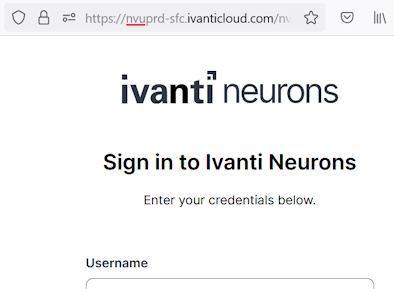
Current landscapes are:
- FRU for EU-based customers who want to host their data inside the EU.
- MLU for Asia-Pacific-based (APAC) customers.
- NVU for America-based (AMER) customers.
- TKU for Japan-based (JPN) customers.
- TTU for Canada-based (CAN) customers.
- UKU for Europe, Middle-East or Africa-based (EMEA) customers.
If you need help understanding in which landscape your environment is hosted, feel free to reach out to your account representative or Ivanti Support.
Landscape-specific settings
The sections below list the landscape-specific URLs, IP addresses, and ports needed for each of the Ivanti Neurons Platform services. The services available in your environment depend on which Ivanti Neurons license you have.
You can use the menu on the right to jump to the desired section.
FRU landscape
| Service | URL | IP address | Required ports |
|---|---|---|---|
| Agent (required) | |||
| Backbone Neurons Communications | fruprd-sfc.ivanticloud.com | Dynamic | 443 (TCP) |
| Agent Communications | fru-prd.mqtt.ivanticloud.com ws-mqtt-fru-prd.ivanticloud.com | 20.79.245.45 Dynamic | 8883 (TCP) 443 (TCP) - MQTT communication over port 8883 is recommended. If you experience firewall or proxy issues, contact Ivanti Support to enable MQTT over port 443 (WebSocket) for your Neurons environment. |
| Connector Engine | Local traffic | Local traffic | 443 (TCP) |
| Connector Engine – SQL | Local traffic | Local traffic | As defined by your SQL Server instance |
| App Control | |||
| App Control Engine | https://saappctrlfru.blob.core.windows.net/ | Dynamic | 443 (TCP) |
| Edge Intelligence | |||
| Real-Time Engine | fru-prd.mqtt.ivanticloud.com ws-mqtt-fru-prd.ivanticloud.com | 20.79.245.45 Dynamic | 8883 (TCP) 443 (TCP) - MQTT communication over port 8883 is recommended. If you experience firewall or proxy issues, contact Ivanti Support to enable MQTT over port 443 (WebSocket) for your Neurons environment. |
| Remote Control | |||
| Remote Control on the Endpoint machine | fruprd-rc.ivanticloud.com | 20.79.146.18 | Port Range 44345 to 44348 (TCP) (all) |
| Remote Control for the Analyst machine | Port Range 45344 to 45347 (TCP) (all) | ||
| Patch Management | |||
| Patch Engine - Vendors | See Vendor list at https://forums.ivanti.com | 443/80 (TCP, outbound only) | |
| Patch Engine - Sideload | sapatchtenantfilesd467b8.blob.core.windows.net sapatchtenantfiles2d467b.blob.core.windows.net | Dynamic | 443 (TCP, outbound only) |
| Discovery | |||
| AgentlessEngine | Local traffic | Local traffic | 445 (TCP) 135 (TCP) |
| IvantiCsepEngine | Local traffic | Local traffic | 33554 (TCP and UDP) 33555 (UDP) |
| IvantiDiscoveryEngine | Local traffic | Local traffic | 137 (UDP) 53 (UDP) |
| Deployment | |||
DeploymentEngine | fruprd-adpstat.ivanticloud.com | Dynamic | 443 (TCP) |
DeploymentEngine | Local traffic | Local traffic | 445 (TCP) Optional for NETBIOS: 139 (TCP) 137-138 (UDP) |
DeploymentEngine | Local traffic | Local traffic | 22 (TCP) macOS and Linux |
| Status of, for example, Deployment and Discovery Scan | |||
| Live updates of the UI (instead of refreshing the webpage) | https://agent-management-signalr-notifications-fru-prd.service.signalr.net/client/negotiate | ||
wss://agent-management-signalr-notifications-fru-prd.service.signalr.net/client/ | |||
MLU landscape
| Service | URL | IP address | Required ports |
|---|---|---|---|
| Agent (required) | |||
| Backbone Neurons Communications | mluprd-sfc.ivanticloud.com | Dynamic | 443 (TCP) |
| Agent Communications | mlu-prd.mqtt.ivanticloud.com ws-mqtt-mlu-prd.ivanticloud.com | 20.53.68.63 Dynamic | 8883 (TCP) 443 (TCP) - MQTT communication over port 8883 is recommended. If you experience firewall or proxy issues, contact Ivanti Support to enable MQTT over port 443 (WebSocket) for your Neurons environment. |
| Connector Engine | Local traffic | Local traffic | 443 (TCP) |
| Connector Engine – SQL | Local traffic | Local traffic | As defined by your SQL Server instance |
| App Control | |||
| App Control Engine | https://saappctrlmlu.blob.core.windows.net/ | Dynamic | 443 (TCP) |
| Edge Intelligence | |||
| Real-Time Engine | mlu-prd.mqtt.ivanticloud.com ws-mqtt-mlu-prd.ivanticloud.com | 20.53.68.63 Dynamic | 8883 (TCP) 443 (TCP) - MQTT communication over port 8883 is recommended. If you experience firewall or proxy issues, contact Ivanti Support to enable MQTT over port 443 (WebSocket) for your Neurons environment. |
| Remote Control | |||
| Remote Control on the Endpoint machine | mluprd-rc.ivanticloud.com | 20.53.149.64 | Port Range 44345 to 44348 (TCP) (all) |
| Remote Control for the Analyst machine | Port Range 45344 to 45347 (TCP) (all) | ||
| Patch Management | |||
| Patch Engine - Vendors | See Vendor list at https://forums.ivanti.com | 443/80 (TCP, outbound only) | |
| Patch Engine - Sideload | sapatchtenantfiles0a0009.blob.core.windows.net sapatchtenantfiles20a000.blob.core.windows.net | Dynamic | 443 (TCP, outbound only) |
| Discovery | |||
| AgentlessEngine | Local traffic | Local traffic | 445 (TCP) 135 (TCP) |
| IvantiCsepEngine | Local traffic | Local traffic | 33554 (TCP and UDP) 33555 (UDP) |
| IvantiDiscoveryEngine | Local traffic | Local traffic | 137 (UDP) 53 (UDP) |
| Deployment | |||
DeploymentEngine | mluprd-adpstat.ivanticloud.com | Dynamic | 443 (TCP) |
DeploymentEngine | Local traffic | Local traffic | 445 (TCP) Optional for NETBIOS: 139 (TCP) 137-138 (UDP) |
DeploymentEngine | Local traffic | Local traffic | 22 (TCP) macOS and Linux |
| Status of, for example, Deployment and Discovery Scan | |||
| Live updates of the UI (instead of refreshing the webpage) | https://agent-management-signalr-notifications-mlu-prd.service.signalr.net/client/negotiate | ||
wss://agent-management-signalr-notifications-mlu-prd.service.signalr.net/client/ | |||
NVU landscape
| Service | URL | IP address | Required ports |
|---|---|---|---|
| Agent (required) | |||
| Backbone Neurons Communications | nvuprd-sfc.ivanticloud.com | Dynamic | 443 (TCP) |
| Agent Communications | nvu-prd.mqtt.ivanticloud.com ws-mqtt-nvu-prd.ivanticloud.com | 20.81.12.92 Dynamic | 8883 (TCP) 443 (TCP) - MQTT communication over port 8883 is recommended. If you experience firewall or proxy issues, contact Ivanti Support to enable MQTT over port 443 (WebSocket) for your Neurons environment. |
| Connector Engine | Local traffic | Local traffic | 443 (TCP) |
| Connector Engine – SQL | Local traffic | Local traffic | As defined by your SQL Server instance |
| App Control | |||
| App Control Engine | https://saappctrlnvu.blob.core.windows.net/ | Dynamic | 443 (TCP) |
| Edge Intelligence | |||
| Real-Time Engine | nvu-prd.mqtt.ivanticloud.com ws-mqtt-nvu-prd.ivanticloud.com | 20.81.12.92 Dynamic | 8883 (TCP) 443 (TCP) - MQTT communication over port 8883 is recommended. If you experience firewall or proxy issues, contact Ivanti Support to enable MQTT over port 443 (WebSocket) for your Neurons environment. |
| Remote Control | |||
| Remote Control on the Endpoint machine | nvuprd-rc.ivanticloud.com | 20.75.194.96 | Port Range 44345 to 44348 (TCP) (all) |
| Remote Control for the Analyst machine | Port Range 45344 to 45347 (TCP) (all) | ||
| Patch Management | |||
| Patch Engine - Vendors | See Vendor list at https://forums.ivanti.com | 443/80 (TCP, outbound only) | |
| Patch Engine - Sideload | sapatchtenantfilesc49a57.blob.core.windows.net sapatchtenantfiles2c49a5.blob.core.windows.net | Dynamic | 443 (TCP, outbound only) |
| Discovery | |||
| AgentlessEngine | Local traffic | Local traffic | 445 (TCP) 135 (TCP) |
| IvantiCsepEngine | Local traffic | Local traffic | 33554 (TCP and UDP) 33555 (UDP) |
| IvantiDiscoveryEngine | Local traffic | Local traffic | 137 (UDP) 53 (UDP) |
| Deployment | |||
DeploymentEngine | nvuprd-adpstat.ivanticloud.com | Dynamic | 443 (TCP) |
DeploymentEngine | Local traffic | Local traffic | 445 (TCP) Optional for NETBIOS: 139 (TCP) 137-138 (UDP) |
DeploymentEngine | Local traffic | Local traffic | 22 (TCP) macOS and Linux |
| Status of, for example, Deployment and Discovery Scan | |||
| Live updates of the UI (instead of refreshing the webpage) | https://agent-management-signalr-notifications-nvu-prd.service.signalr.net/client/negotiate | ||
wss://agent-management-signalr-notifications-nvu-prd.service.signalr.net/client/ | |||
TKU landscape
| Service | URL | IP address | Required ports |
|---|---|---|---|
| Agent (required) | |||
| Backbone Neurons Communications | tkuprd-sfc.ivanticloud.com | Dynamic | 443 (TCP) |
| Agent Communications | tku-prd.mqtt.ivanticloud.com ws-mqtt-tku-prd.ivanticloud.com | 4.189.25.254 Dynamic | 8883 (TCP) 443 (TCP) - MQTT communication over port 8883 is recommended. If you experience firewall or proxy issues, contact Ivanti Support to enable MQTT over port 443 (WebSocket) for your Neurons environment. |
| Connector Engine | Local traffic | Local traffic | 443 (TCP) |
| Connector Engine – SQL | Local traffic | Local traffic | As defined by your SQL Server instance |
| App Control | |||
| App Control Engine | https://saappctrltku.blob.core.windows.net/ | Dynamic | 443 (TCP) |
| Edge Intelligence | |||
| Real-Time Engine | tku-prd.mqtt.ivanticloud.com ws-mqtt-tku-prd.ivanticloud.com | 4.189.25.254 Dynamic | 8883 (TCP) 443 (TCP) - MQTT communication over port 8883 is recommended. If you experience firewall or proxy issues, contact Ivanti Support to enable MQTT over port 443 (WebSocket) for your Neurons environment. |
| Remote Control | |||
| Remote Control on the Endpoint machine | tkuprd-rc.ivanticloud.com | 4.241.23.131 | Port Range 44345 to 44348 (TCP) (all) |
| Remote Control for the Analyst machine | Port Range 45344 to 45347 (TCP) (all) | ||
| Patch Management | |||
| Patch Engine - Vendors | See Vendor list at https://forums.ivanti.com | 443/80 (TCP, outbound only) | |
| Patch Engine - Sideload | Sapatchtenantfiles7d3d2f.blob.core.windows.net sapatchtenantfiles27d3d2.blob.core.windows.net | Dynamic | 443 (TCP, outbound only) |
| Discovery | |||
| AgentlessEngine | Local traffic | Local traffic | 445 (TCP) 135 (TCP) |
| IvantiCsepEngine | Local traffic | Local traffic | 33554 (TCP and UDP) 33555 (UDP) |
| IvantiDiscoveryEngine | Local traffic | Local traffic | 137 (UDP) 53 (UDP) |
| Deployment | |||
DeploymentEngine | tkuprd-adpstat.ivanticloud.com | Dynamic | 443 (TCP) |
DeploymentEngine | Local traffic | Local traffic | 445 (TCP) Optional for NETBIOS: 139 (TCP) 137-138 (UDP) |
DeploymentEngine | Local traffic | Local traffic | 22 (TCP) macOS and Linux |
| Status of, for example, Deployment and Discovery Scan | |||
| Live updates of the UI (instead of refreshing the webpage) | https://agent-management-signalr-notifications-tku-prd.service.signalr.net/client/negotiate | ||
wss://agent-management-signalr-notifications-tku-prd.service.signalr.net/client/ | |||
TTU landscape
| Service | URL | IP address | Required ports |
|---|---|---|---|
| Agent (required) | |||
| Backbone Neurons Communications | ttuprd-sfc.ivanticloud.com | Dynamic | 443 (TCP) |
| Agent Communications | ttu-prd.mqtt.ivanticloud.com ws-mqtt-ttu-prd.ivanticloud.com | 4.172.56.29 Dynamic | 8883 (TCP) 443 (TCP) - MQTT communication over port 8883 is recommended. If you experience firewall or proxy issues, contact Ivanti Support to enable MQTT over port 443 (WebSocket) for your Neurons environment. |
| Connector Engine | Local traffic | Local traffic | 443 (TCP) |
| Connector Engine – SQL | Local traffic | Local traffic | As defined by your SQL Server instance |
| App Control | |||
| App Control Engine | https://saappctrlttu.blob.core.windows.net/ | Dynamic | 443 (TCP) |
| Edge Intelligence | |||
| Real-Time Engine | ttu-prd.mqtt.ivanticloud.com ws-mqtt-ttu-prd.ivanticloud.com | 4.172.56.29 Dynamic | 8883 (TCP) 443 (TCP) - MQTT communication over port 8883 is recommended. If you experience firewall or proxy issues, contact Ivanti Support to enable MQTT over port 443 (WebSocket) for your Neurons environment. |
| Remote Control | |||
| Remote Control on the Endpoint machine | ttuprd-rc.ivanticloud.com | 20.220.252.197 | Port Range 44345 to 44348 (TCP) (all) |
| Remote Control for the Analyst machine | Port Range 45344 to 45347 (TCP) (all) | ||
| Patch Management | |||
| Patch Engine - Vendors | See Vendor list at https://forums.ivanti.com | 443/80 (TCP, outbound only) | |
| Patch Engine - Sideload | Sapatchtenantfilesa1aefe.blob.core.windows.net sapatchtenantfiles2a1aef.blob.core.windows.net | Dynamic | 443 (TCP, outbound only) |
| Discovery | |||
| AgentlessEngine | Local traffic | Local traffic | 445 (TCP) 135 (TCP) |
| IvantiCsepEngine | Local traffic | Local traffic | 33554 (TCP and UDP) 33555 (UDP) |
| IvantiDiscoveryEngine | Local traffic | Local traffic | 137 (UDP) 53 (UDP) |
| Deployment | |||
DeploymentEngine | ttuprd-adpstat.ivanticloud.com | Dynamic | 443 (TCP) |
DeploymentEngine | Local traffic | Local traffic | 445 (TCP) Optional for NETBIOS: 139 (TCP) 137-138 (UDP) |
DeploymentEngine | Local traffic | Local traffic | 22 (TCP) macOS and Linux |
| Status of, for example, Deployment and Discovery Scan | |||
| Live updates of the UI (instead of refreshing the webpage) | https://agent-management-signalr-notifications-ttu-prd.service.signalr.net/client/negotiate | ||
wss://agent-management-signalr-notifications-ttu-prd.service.signalr.net/client/ | |||
UKU landscape
| Service | URL | IP address | Required ports |
|---|---|---|---|
| Agent (required) | |||
| Backbone Neurons Communications | ukuprd-sfc.ivanticloud.com | Dynamic | 443 (TCP) |
| Agent Communications | uku-prd.mqtt.ivanticloud.com ws-mqtt-uku-prd.ivanticloud.com | 20.49.172.247 Dynamic | 8883 (TCP) 443 (TCP) - MQTT communication over port 8883 is recommended. If you experience firewall or proxy issues, contact Ivanti Support to enable MQTT over port 443 (WebSocket) for your Neurons environment. |
| Connector Engine | Local traffic | Local traffic | 443 (TCP) |
| Connector Engine – SQL | Local traffic | Local traffic | As defined by your SQL Server instance |
| App Control | |||
| App Control Engine | https://saappctrluku.blob.core.windows.net/ | Dynamic | 443 (TCP) |
| Edge Intelligence | |||
| Real-Time Engine | uku-prd.mqtt.ivanticloud.com ws-mqtt-uku-prd.ivanticloud.com | 20.49.172.247 Dynamic | 8883 (TCP) 443 (TCP) - MQTT communication over port 8883 is recommended. If you experience firewall or proxy issues, contact Ivanti Support to enable MQTT over port 443 (WebSocket) for your Neurons environment. |
| Remote Control | |||
| Remote Control on the Endpoint machine | ukuprd-rc.ivanticloud.com | 20.77.156.96 | Port Range 44345 to 44348 (TCP) (all) |
| Remote Control for the Analyst machine | Port Range 45344 to 45347 (TCP) (all) | ||
| Patch Management | |||
| Patch Engine - Vendors | See Vendor list at https://forums.ivanti.com | 443/80 (TCP, outbound only) | |
| Patch Engine - Sideload | sapatchtenantfiles8061b2.blob.core.windows.net sapatchtenantfiles28061b.blob.core.windows.net | Dynamic | 443 (TCP, outbound only) |
| Discovery | |||
| AgentlessEngine | Local traffic | Local traffic | 445 (TCP) 135 (TCP) |
| IvantiCsepEngine | Local traffic | Local traffic | 33554 (TCP and UDP) 33555 (UDP) |
| IvantiDiscoveryEngine | Local traffic | Local traffic | 137 (UDP) 53 (UDP) |
| Deployment | |||
DeploymentEngine | ukuprd-adpstat.ivanticloud.com | Dynamic | 443 (TCP) |
DeploymentEngine | Local traffic | Local traffic | 445 (TCP) Optional for NETBIOS: 139 (TCP) 137-138 (UDP) |
DeploymentEngine | Local traffic | Local traffic | 22 (TCP) macOS and Linux |
| Status of, for example, Deployment and Discovery Scan | |||
| Live updates of the UI (instead of refreshing the webpage) | https://agent-management-signalr-notifications-uku-prd.service.signalr.net/client/negotiate | ||
wss://agent-management-signalr-notifications-uku-prd.service.signalr.net/client/ | |||